

Frequently, questions arise on the ServiceNow Community regarding HRSD Case Routing based on location, and here’s a straightforward solution you can implement right away.
To route HR cases in ServiceNow to HR agents based on their locations, you can use ServiceNow’s built-in features for case assignment and routing.
Here’s a step-by-step guide on how to achieve this:
- Create Locations and HR Agents Profiles:
- Start by defining locations and HR agent profiles in ServiceNow. Locations can be represented as “Locations” in the CMDB or as records in a custom table.
- For HR agents, create user profiles or groups in ServiceNow and assign the respective locations to each agent or group.
- Configure Assignment Groups:
- Create assignment groups based on locations. These assignment groups will be used to group HR cases by location.
- For example, you can have assignment groups like “HR – New York,” “HR – Los Angeles,” and so on, matching your defined locations.
- Define Assignment Rules:
- Create assignment rules that route cases to the appropriate assignment group based on the location associated with the case.
- Go to “Service Catalog” or “Case Management” in ServiceNow, depending on how your HR cases are created.
- Configure the “Assignment Rules” or “Case Routing Rules” to evaluate the location of the HR case and assign it to the corresponding assignment group.
- Configure Assignment Rules Script:
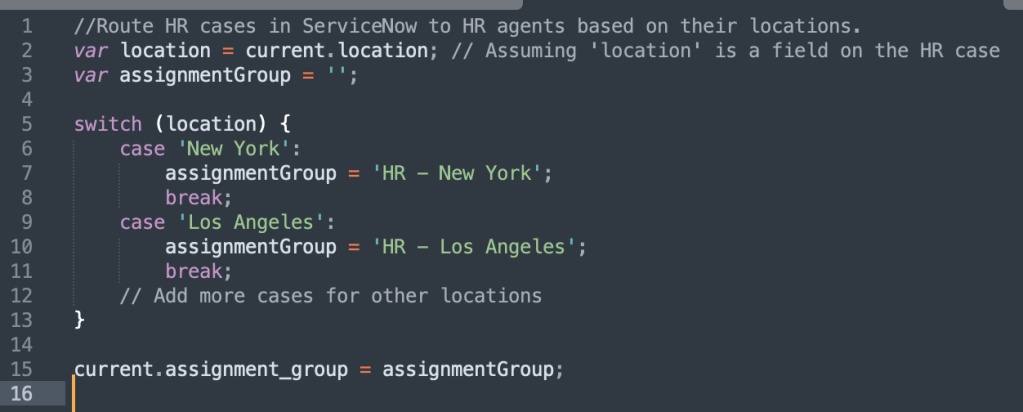
- You may need to use a script to evaluate the location and determine the correct assignment group. You can use business rules, script includes, or other scripting methods to achieve this.
- Sample script logic (JavaScript) might look like this:
- Test the Routing:
• Create test HR cases with different locations to ensure that they are being correctly assigned to the respective assignment groups and HR agents. - Automate Case Assignment:
• To automate the assignment process, you can trigger the assignment rules when a new HR case is created or when its location is updated. You can use business rules, workflow, or script triggers to achieve this. - Monitoring and Maintenance:
• Regularly review and update assignment rules and agent profiles as needed to accommodate changes in locations or HR agents.
By following these steps, you can ensure that HR cases in ServiceNow are routed to the appropriate HR agents based on their respective locations, streamlining the case management process and improving efficiency in handling HR requests.
Good Luck!
James @Ecostratus

 SNC Development
You must be logged in to post a comment.